Multi-angle virtual staging: one room, every photo
Multi-angle virtual staging shows the same furniture in the same place in every photo of a room. How tools try to do it, and a ten-minute test for any tool.
On this page
Multi-angle virtual staging means every staged photo of a room shows the same furniture, in the same place and at the same size, each seen from its own camera. A tool that stages each photo as a separate picture cannot promise that, which is how one living room comes back with three different sofas. Tools try to fix it in three ways, and they are not equally reliable. You can test any of them in about ten minutes with three photos of one room and five checks. A room of our own, staged from three corners, shows what a pass looks like.
Key points
- Multi-angle virtual staging means the same pieces, in the same places, at the same sizes, in every photo of one room.
- Photos staged one at a time are designed separately, so the furniture can change between them even with the same prompt: a prompt describes a kind of sofa, not one sofa in one spot.
- A staged photo used as a reference carries the style over. Unless the tool also measures the room, positions and sizes are the model's estimate.
- One 3D model of the furnished room, rendered from each camera, puts the same pieces in the same places at the same sizes in every photo, because there is only one of each piece.
- Three overlapping photos and five checks (pieces, position, size, materials, the building) show in about ten minutes whether a tool keeps a room consistent.
What is multi-angle virtual staging?
Multi-angle virtual staging is staging several photos of the same room so that together they show one furnished room: the same pieces, in the same places, at the same sizes, each seen from where that photo was taken. If the sofa stands under the window in one photo, it stands there in all of them, and the photo taken from behind it shows its back.
It is also called multi-view or consistent staging. It is not the same as a matching style across a listing: a bedroom and a living room in the same colours are coherent, not consistent.
Why do AI-staged photos of one room not match?
Because to the image model, each photo is a new picture. Without a mode built for several photos, a tool sends one photo and an instruction and gets one furnished image back. Stage three photos that way and the room is designed three times, with no record of where the sofa went last time and no measurement of the room.
The makers of the models say as much. OpenAI's image generation guide (opens in a new tab) lists among the limitations of its image models that they "may occasionally struggle to maintain visual consistency for recurring characters or brand elements across multiple generations" and "may have difficulty placing elements precisely in structured or layout-sensitive compositions". A room photographed from three corners asks for both. For what buyers make of a set that disagrees, see why the sofa can't change between photos.
How do tools try to keep a room consistent?
The three methods differ in one thing: whether anything in the process knows where the furniture stands in the room.
| Method | What stays the same | What can drift |
|---|---|---|
| Photo by photo | The style you asked for, roughly | Every piece: its kind, shape, colour, place and size |
| Reference image | How the pieces look: colours, fabrics, general shape | Where pieces stand and how big they are |
| One 3D scene | Which pieces, where they stand, how big they are | Nothing in the layout: there is one of each piece |
Whatever the method, the building itself must come through as photographed. Check 5 of the test covers that.
Photo by photo
This is what a one-photo staging tool or a general AI image app does. Writing the same detailed description for every photo (colour, material, number of seats, which wall) improves the odds, but you tend to get a family of similar sofas rather than one sofa: a grey three-seater under the window each time, with different arms, proportions and positions. That is fine for a single cover photo. For a set, it is the method most likely to fail the test below.
Reference image
The tool stages one photo first and shows it to the model as a guide for the next. One tool's product page (opens in a new tab) describes using "a staged reference image from the same room to guide each additional angle". Others stage two photos at a time.
The look carries over well, because the model can see the sofa it should copy. Placement is harder. Unless the tool also measures the room, the model has to judge from flat pictures where the camera moved and how far away each wall is. Another tool's help page (opens in a new tab) is candid about it: "Review each result: placement and small details can vary."
One 3D scene
The system works out the room's shape and where each photo was taken from, places the furniture once in a 3D model of the room at real size, and renders (draws by computer) that model from each photo's camera position. Every photo starts from the same sofa in the same spot, because there is only one sofa.
This is how Livium AI, the tool we make, works. An AI image model then paints the final photos from those renders, so each one reads as a photograph while the layout stays the one in the model. Other tools also claim consistency across angles, and the test below lets you compare any of them on your own rooms.
How to tell which method a tool uses
Ask to see the layout as a floor plan or a 3D view before the photos are made, and ask whether moving one piece moves it in every photo. A yes to both points to a single scene. A tool that stages photos in pairs, or asks you to choose a reference photo, is most likely using the second method.
How can you test a staging tool in ten minutes?
Stage three overlapping photos of one room, then run five checks across the results. Each check takes about two minutes once the photos are back.
Use a room from a listing you have now, not the vendor's demo: say, a one-bedroom in Dubai Marina with the living room photographed from two opposite corners and the middle of one wall. Every photo should share a window, a door or a corner with another. Stage all three with the same settings and lay the results side by side at full size, each next to its original.
- Same pieces. List every piece in the first photo and find each one in the others wherever its part of the room is in view. Fail: a lamp or chair in one photo only, or a three-seater that becomes a corner sofa.
- Same position. Note where each large piece stands against two fixed features: a window, the door, a radiator or air-conditioning grille, a corner. Judge it where the legs meet the floor, because furniture slides across the wall behind it as the camera moves. On a tiled floor, count the tiles between the piece and the wall. Fail: the sofa is under the window from one side and beside the door from the other.
- Same size. Compare each piece with something fixed near it: the window it stands under, the door, the tiles the rug covers. Fail: a rug that covers four tiles in one photo and six in the next.
- Same colours and materials. Zoom in on the fabric, wood tone, legs, metal and cushions. Sun and shade make fabric look lighter or darker, and that is fine. Fail: grey becomes beige, leather becomes fabric, black legs turn to wood.
- Nothing in the building changed. Flick between each staged photo and its original at the same size: windows, doors, sockets, light fittings, floor, the view, and whatever the furniture now covers. Fail: anything permanent has moved, changed or gone. This fails a photo on its own, however well the furniture matches.
A pass is all three photos passing all five checks, apart from small differences you would be happy to explain to a buyer at a viewing. If you have another ten minutes, stage the same room again. A tool that passes once and fails the second time got lucky the first time.
What does a consistent set look like?
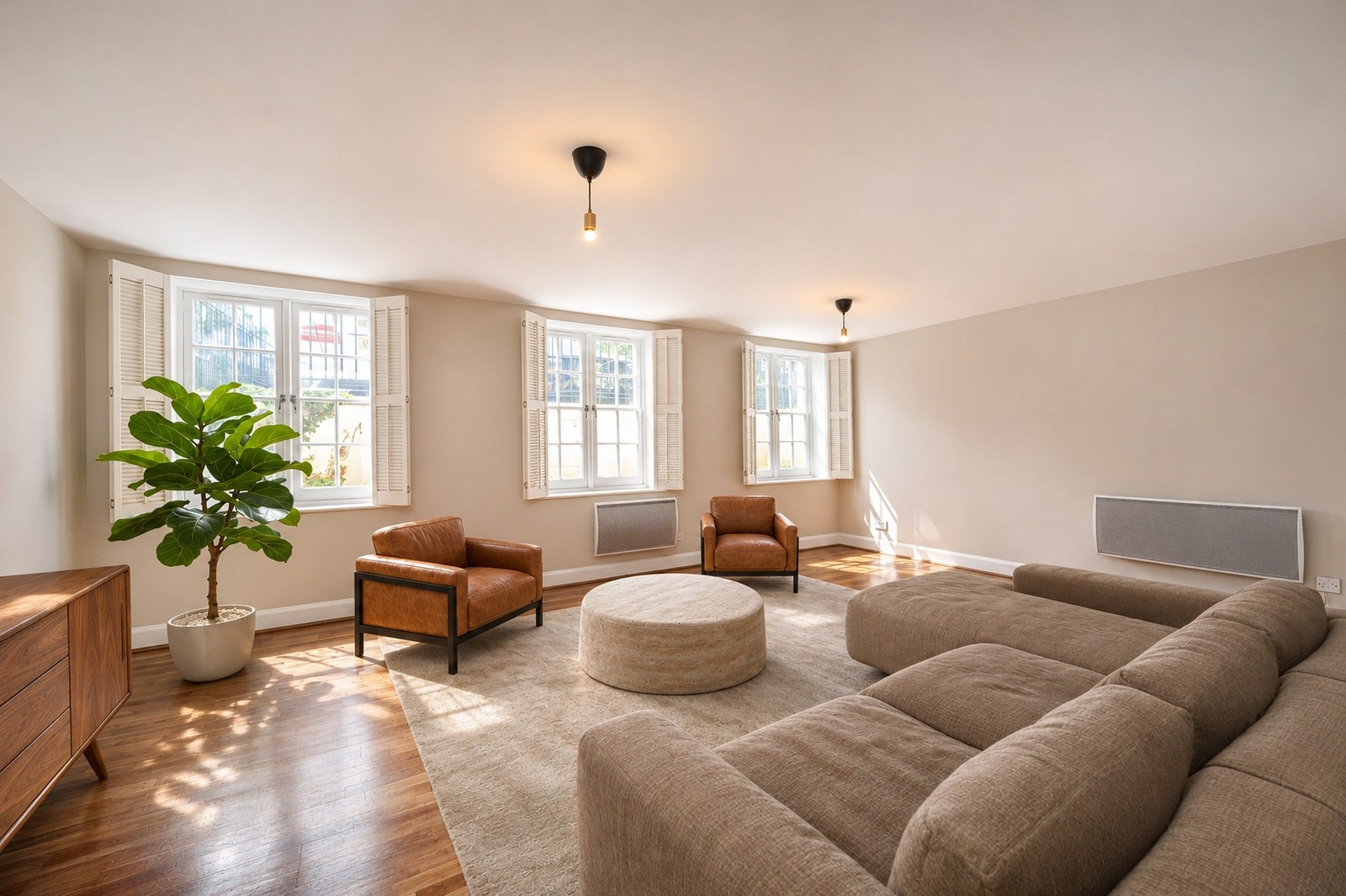
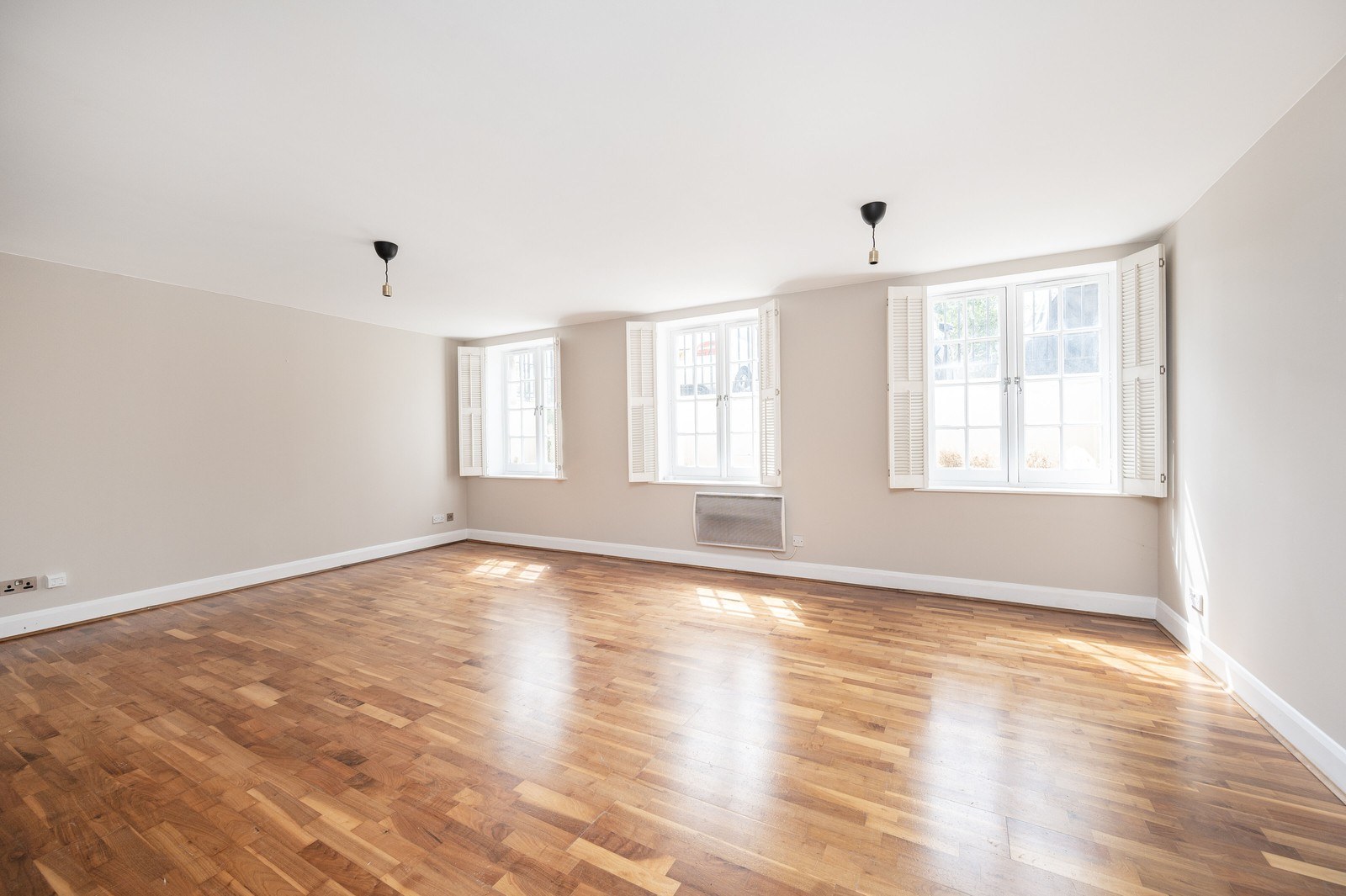
A consistent set shows the same pieces, in the same places and at the same sizes, from every camera. Here is one of ours: an empty living room, photographed from three positions and staged once with Livium AI. Its three shuttered windows make positions easy to check.
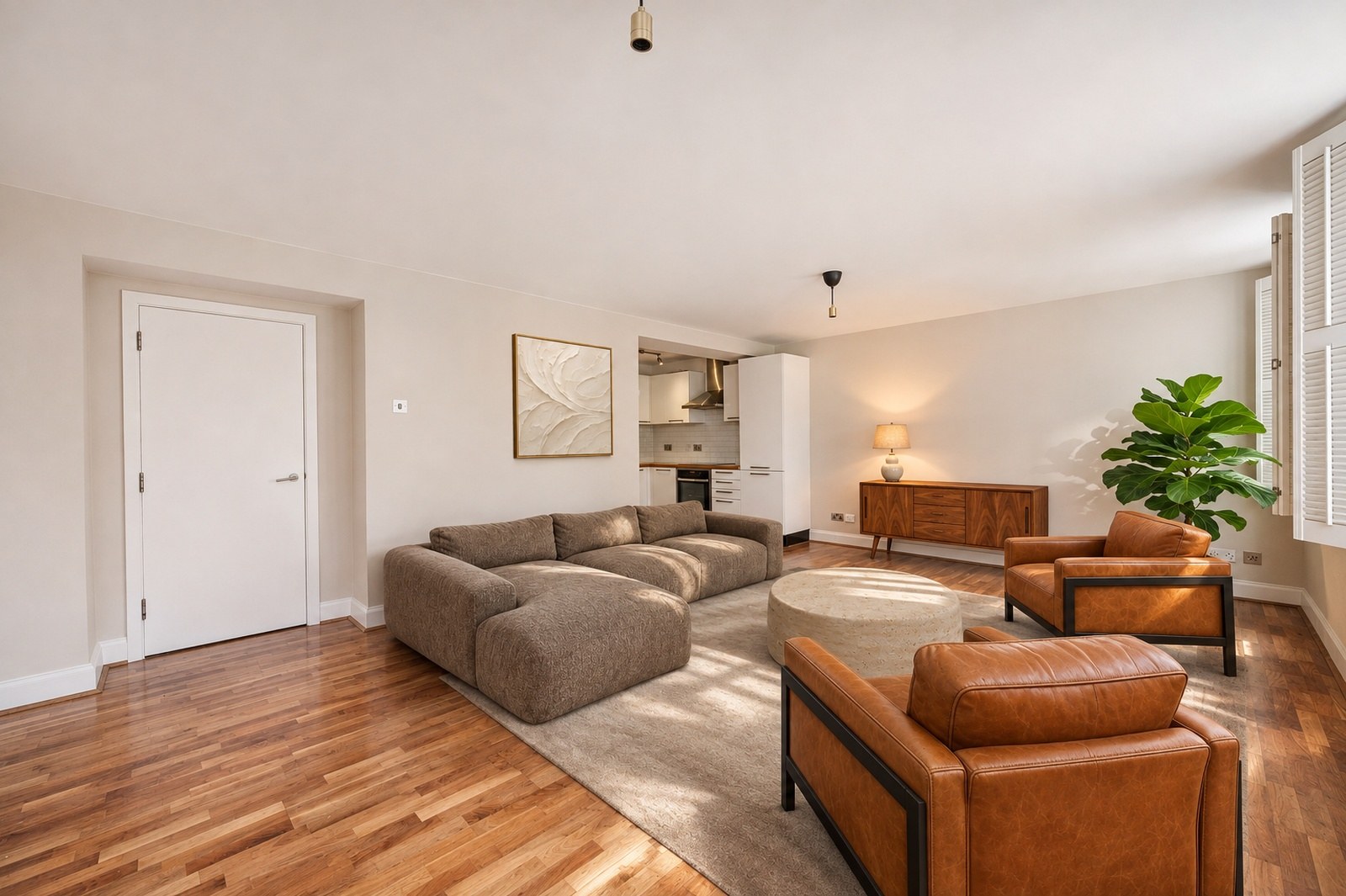
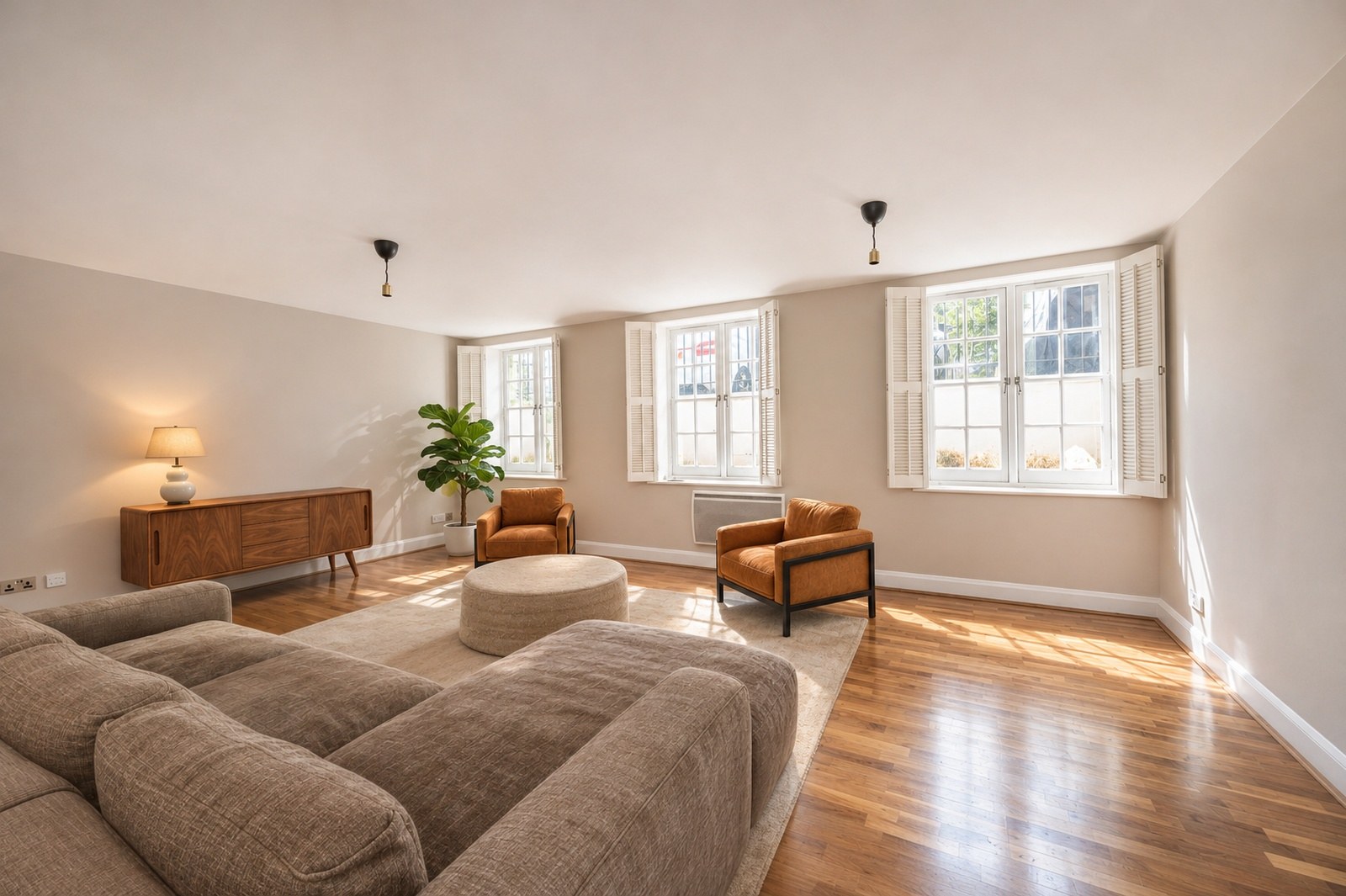
Run checks 1 to 3 on these three photos: the same sofa, armchairs, round coffee table, sideboard and fig stand in the same places, at the same sizes, from all three cameras. That is what one furnished model of the room gives you. There is one sofa, so it cannot become a different sofa between photos.
Checks 4 and 5 pass as well. The taupe fabric, the cognac leather and the walnut look the same from every camera, and the windows, shutters, door, kitchen and ceiling lights are the room's own, as photographed.
How should you photograph a room for a multi-angle set?
Take overlapping photos from different corners, in one visit and the same light. Our guide to photographing an empty room for staging covers where to stand and what to clear. The tutorial for COLMAP (opens in a new tab), an open-source program that works out camera positions from photos, gives capture advice for 3D reconstruction, which is the job a 3D-scene tool does when it measures a room:
- Overlap. It asks for "high visual overlap". Get each window and the door into at least two photos.
- Move between photos. It says not to take images "from the same location by only rotating the camera". Walk to a new corner for each shot.
- Same light. It asks for "similar illumination conditions". Set the lights, curtains and blinds once, and stand with a wall of glass to one side rather than shooting into it.
- Edges in frame. It warns against "completely texture-less images (e.g., a white wall or empty desk)". In an empty white flat, keep corners, door frames and skirting in every photo.
What should you do before a staged set goes live?
Look over each staged photo against its original before it is published, using the five checks above, and make again any photo that fails or use the original in its place. Our list of virtual staging mistakes that make a listing look fake shows what each failure looks like.
Then label each staged photo as virtually staged, and keep the originals so you can show a buyer the room as it is. Our AI disclosure policy explains how we handle labels and disclosure.
Common questions
How many photos of one room can be staged together?
It depends on the tool. Some stage two at a time, and one help page (opens in a new tab) says "Consistency holds within each pair, not across pairs", so four photos of one room come back as two pairs that need not match each other. Livium AI takes up to six photos of one room and stages them all from the same model, so all six show the same furniture in the same places. Three photos, from two opposite corners and the middle of a wall, show nearly every wall of an ordinary rectangular room.
Does it work on furnished rooms?
Yes, if the tool removes the existing furniture first. A set helps with that step: the wall the owner's sofa hides in one photo is often in plain view in another, so compare each cleared photo with the original that saw that wall.
Is a consistent set required by any rule?
We found no rule that says the staged photos of one room must match each other. The rules we read deal with honesty and with the building. Article 12 of the US National Association of Realtors' Code of Ethics (opens in a new tab) says its members "shall present a true picture in their advertising". Proposed guidelines from NorthstarMLS (opens in a new tab) (10 July 2026), a US multiple listing service (MLS, the shared database agents list homes on), would prohibit "Alterations that change or hide permanent or structural elements of the property". In our view, a set in which the furniture moves can still give a wrong idea of the space, which is hard to square with a true picture. For the UAE, see our guide to virtual staging in Dubai.
Can I change one piece and keep the rest?
With a 3D-scene tool, yes: you change the piece in the room's layout and the photos are made again from the same scene. With a photo-by-photo tool, editing one photo leaves the others as they were, so the set stops matching.
Try the test on your own room
Upload up to six ordinary photos of a living room or bedroom, choose the pieces or press "Furnish for me", and Livium AI builds one furnished 3D model of the room and renders every photo from it, usually in minutes. Every original stays next to its staged photo. Confirm your email address and you get 25 free credits, with no card: enough to stage the three photos the test needs, watermarked until your first purchase. Start free.
Stage the room once.
Every photo matches.
Upload a few photos of the empty room. Livium AI furnishes it once, in one 3D model with every piece at its real size, so every photo of the listing shows the same furniture in the same place.
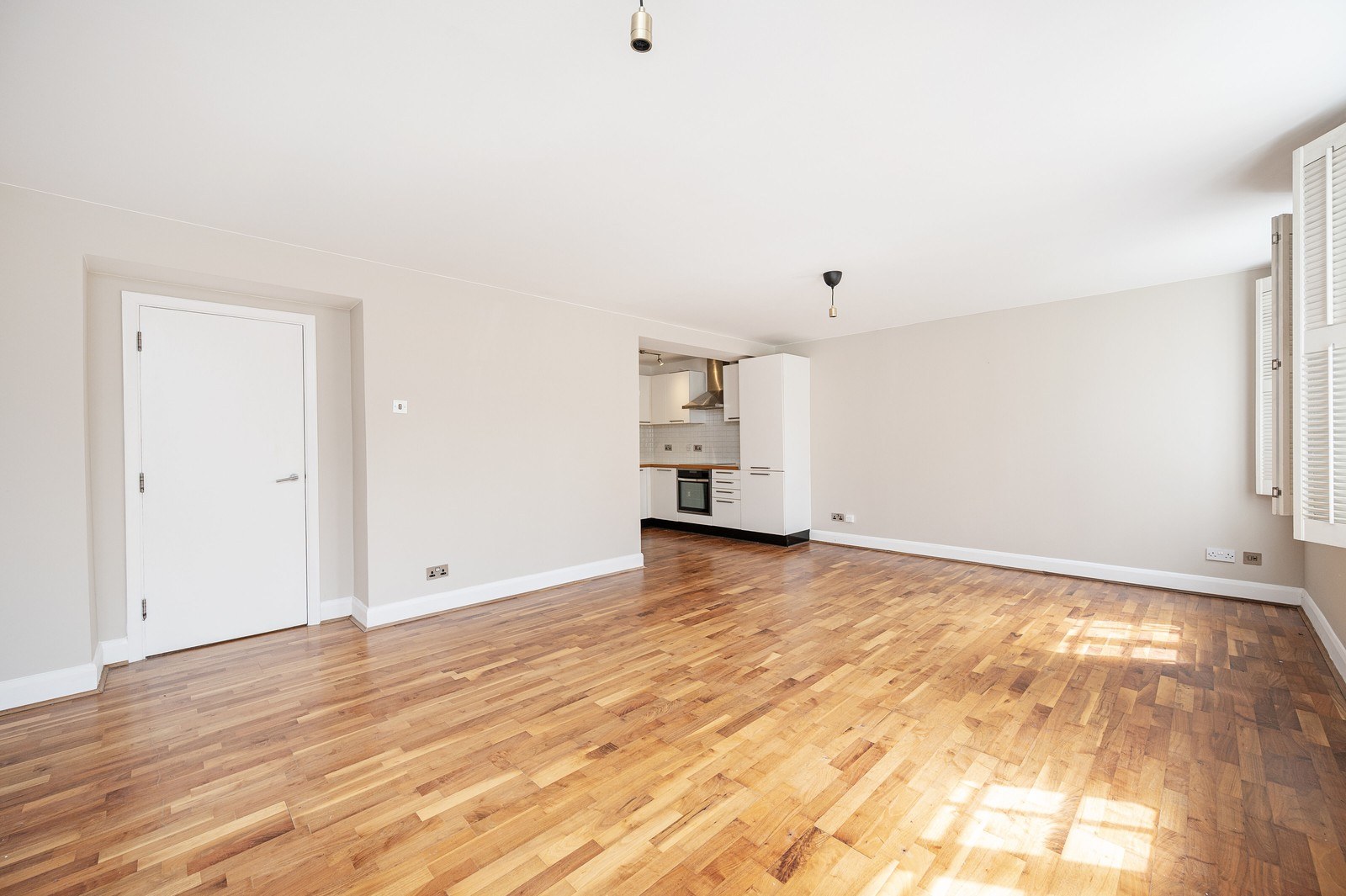 As photographedStaged by Livium AI
Sources
- Image generation guide: Limitations (opens in a new tab), OpenAI API documentation, undated, last checked 16 November 2026
- Multi-angle virtual staging for real estate (opens in a new tab), virtualstaging.art product page, undated, last checked 16 November 2026
- Can I get the same furniture in staged photos of the same room from different angles? (opens in a new tab), ListingAI FAQ, undated, last checked 16 November 2026
- Can I stage multiple photos from the same shoot at once? (opens in a new tab), AutoHDR Help Center, undated, last checked 16 November 2026
- Tutorial: Structure-from-Motion (opens in a new tab), COLMAP documentation, undated, last checked 16 November 2026
- Code of Ethics, Article 12 (opens in a new tab), National Association of Realtors, 2026 edition (effective 1 January 2026), last checked 16 November 2026
- Guidelines for Virtual Staging and AI-Enhanced Listing Photos (opens in a new tab), NorthstarMLS, proposed guidelines, 10 July 2026, last checked 16 November 2026
- AI and Virtual Staging Disclosure Policy, Livium AI
Keep reading
Can ChatGPT do virtual staging? What works, what doesn't
ChatGPT and Gemini can stage one listing photo well. Where they slip on a room's other photos, furniture size and the building, and what to check first.
9 virtual staging mistakes that make a listing look fake
The staging mistakes that matter are not about taste: furniture that changes, wrong sizes and an altered building. How to catch all nine, with a checklist.
Why the sofa can't change between photos
AI-staged photos of one room often disagree because each is staged as a separate picture. What buyers see, why prompts don't fix it, and how to check a set.